Geometrical varieties
Implicit
While drawing vector shapes, one always assumes that the canvas that receives shapes is euclidean.
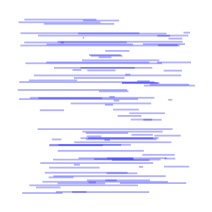
If you draw some horizontal lines in a random way, you then get the following result:
|
|
require 'xrvg'
include XRVG

render = SVGRender[:imagesize,"3cm"]
style = Style[ :stroke, Color.blue( 0.3 ), :strokewidth, 0.01 ]
100.times do
  xs = (0.0..1.0).ssort().rand( 2 )
  y  = (0.0..1.0).rand
  render.add( Line[ :points, xs.map {|x| V2D[x, y]} ], style )
end
render.end
|
But what if you change this assumption ?
Interbezier
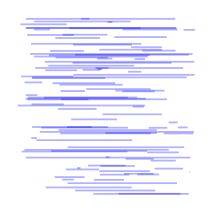
One first way to generalize the previous example is to consider that instead of drawing many somehow unrelated curves, with related coordinates,
let us define a geometric canvas, that can then be sampled to produce the same result.
You can see that the result is quite (sic!) comparable:
|
|
require 'xrvg'
include XRVG

render = SVGRender[:imagesize,"3cm"]
style = Style[ :stroke, Color.blue( 0.3 ), :strokewidth, 0.01 ]
support1 = LinearBezier[ :support, [V2D::O, V2D::X] ]
support2 = support1.translate( V2D::Y )
interbezier  = InterBezier[ :bezierlist, [0.0, support1, 1.0, support2 ] ]

100.times do
  xs = (0.0..1.0).ssort().rand( 2 )
  render.add( interbezier.line( xs[0], xs[1], (0.0..1.0).rand ), style )
end
render.end
|
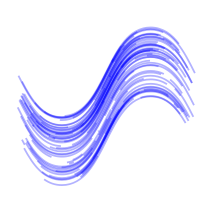
However, the real interest is to change interbezier definition, to get more exotic canvas. Let's do it with ondulations:
|
|
require 'xrvg'
include XRVG

render = SVGRender[:imagesize,"3cm"]
style = Style[ :stroke, Color.blue( 0.3 ), :strokewidth, 0.01 ]
support = LinearBezier[ :support, [V2D::O, V2D::X] ]
support = support.translate(  V2D::Y * 0.2 )
support1 = Ondulation[ :support, support, :freq, 2, :ampl, 0.5 ]
support = support.translate(  -V2D::Y * 0.4 )
support2 = Ondulation[ :support, support, :freq, 2, :ampl, 0.5 ]
interbezier = InterBezier[ :bezierlist, [0.0, support1, 1.0, support2 ] ]

100.times do
  xs = (0.0..1.0).ssort().rand( 2 )
  render.add( interbezier.line( xs[0], xs[1], (0.0..1.0).rand ), style )
end
render.end
|
Better!
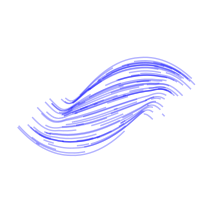
However, we could go even farther by using offset operator, instead of simply translating interbezier range ondulations.
So:
|
|
require 'xrvg'
include XRVG

render = SVGRender[:imagesize,"3cm"]
style = Style[ :stroke, Color.blue( 0.3 ), :strokewidth, 0.01 ]
support  = LinearBezier[ :support, [V2D::O, V2D::X] ]
support  = Ondulation[ :support, support, :freq, 2, :ampl, 0.3 ]
support1 = Offset[ :support, support, :ampl,  0.2 ]
support2 = Offset[ :support, support, :ampl, -0.2 ]

interbezier  = InterBezier[ :bezierlist, [0.0, support1, 1.0, support2 ] ]

100.times do
  xs = (0.0..1.0).ssort().rand( 2 )
  render.add( interbezier.line( xs[0], xs[1], (0.0..1.0).rand ), style )
end
render.end
|
Nice !
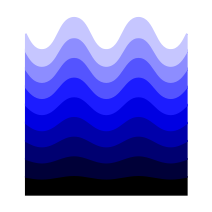
To end this section, let's check a last design:
|
|
require 'xrvg'
include XRVG

render = SVGRender[:imagesize,"3cm"]

line        = LinearBezier[ :support, [V2D::O, V2D::X]]
support     = line.translate( -V2D::Y )
ondulation  = Ondulation[ :support, support, :freq, 5, :ampl, 0.5 ]

gbezier  = GradientBezier[ :bezierlist, [0.0, line, 1.0, ondulation]]

palette = Palette[ :colorlist, [  0.0, Color.black,
                                  0.5, Color.blue,
                                  1.0, Color.white]]
style = Style.new( :strokewidth, 0.01 )
SyncS[gbezier, palette].samples( 10 ) do |bezier, color|
  style.fill = color
  style.stroke = color
  render.add( bezier, style )
end
render.end
|
Offset
As you may have noticed in previous example with offset operator, interpolation with two offset curves gives a nice result,
but not really what we could expect, that is a set of offset curves with different offset values.
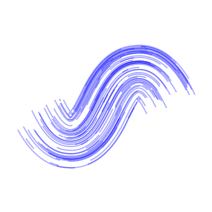
Well, let's just create an offset geometric variety, then !
|
|
require 'xrvg'
include XRVG

render = SVGRender[:imagesize,"3cm"]
style  = Style[ :stroke, Color.blue( 0.3 ), :strokewidth, 0.01 ]
support = LinearBezier[ :support, [V2D::O, V2D::X] ]
support = Ondulation[ :support, support, :freq, 2, :ampl, 0.5 ]
offsetvariety = OffsetVariety[ :support, support, :ampl, 0.2 ]

100.times do
  xs = (0.0..1.0).ssort().rand( 2 )
  y  = (0.0..1.0).rand
  render.add( offsetvariety.line( xs[0], xs[1], y), style )
end
render.end
|
OK! Nice! -> Ahead
Fuseau
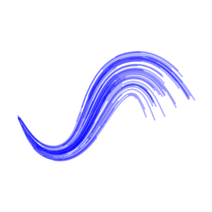
Let's now varying offset value along the curve:
|
|
require 'xrvg'
include XRVG

render = SVGRender[:imagesize,"3cm"]
style  = Style[ :stroke, Color.blue( 0.3 ), :strokewidth, 0.01 ]
support = LinearBezier[ :support, [V2D::O, V2D::X] ]
support = Ondulation[ :support, support, :freq, 2, :ampl, 0.5 ]
fuseauvariety = FuseauVariety[ :support, support, :ampl, 0.2 ]

100.times do
  xs = (0.0..1.0).ssort().rand( 2 )
  y  = (0.0..1.0).rand
  render.add( fuseauvariety.line( xs[0], xs[1], y), style )
end
render.end
|